
Vulnerability scanning
Kaio scans local images for CVEs by running Trivy as a throwaway container. Nothing to install on the host.
Scanning is automatic: in-use images are rescanned every 24 hours by default, starting at server startup, so a report never goes stale on its own. See Scheduled rescans. The scans below are the on-demand way to get a result now.
Running a scan
Section titled “Running a scan”| Scope | Web | TUI | CLI |
|---|---|---|---|
| One image | Image row → Scan | v on the Images tab |
n/a |
| A whole stack | ⋮ STACK → Scan | v |
stack scan <name> |
| Every tagged image | POST /api/images/scan |
n/a | n/a |
Scans run in the background behind a bounded concurrency semaphore
(KAIO_TRIVY_CONCURRENCY, default 2). Results are persisted and the
UI updates live over SSE; nothing blocks while a scan runs.
Reading the results
Section titled “Reading the results”- Severity badges: colour-coded critical / high / medium / low / unknown counts, per image in the Image Management view.
- Per-stack and per-container indicators: every stack row shows an aggregated badge, and each container in an expanded stack shows the badge for its own image.
- Dashboard total: a global tile sums findings across all in-use images. The internal scanner image and unused images are excluded, so the number reflects what is actually running.
- Detailed report: drill into a per-image modal listing each CVE (package, installed → fixed version, severity, advisory link), filterable by severity.
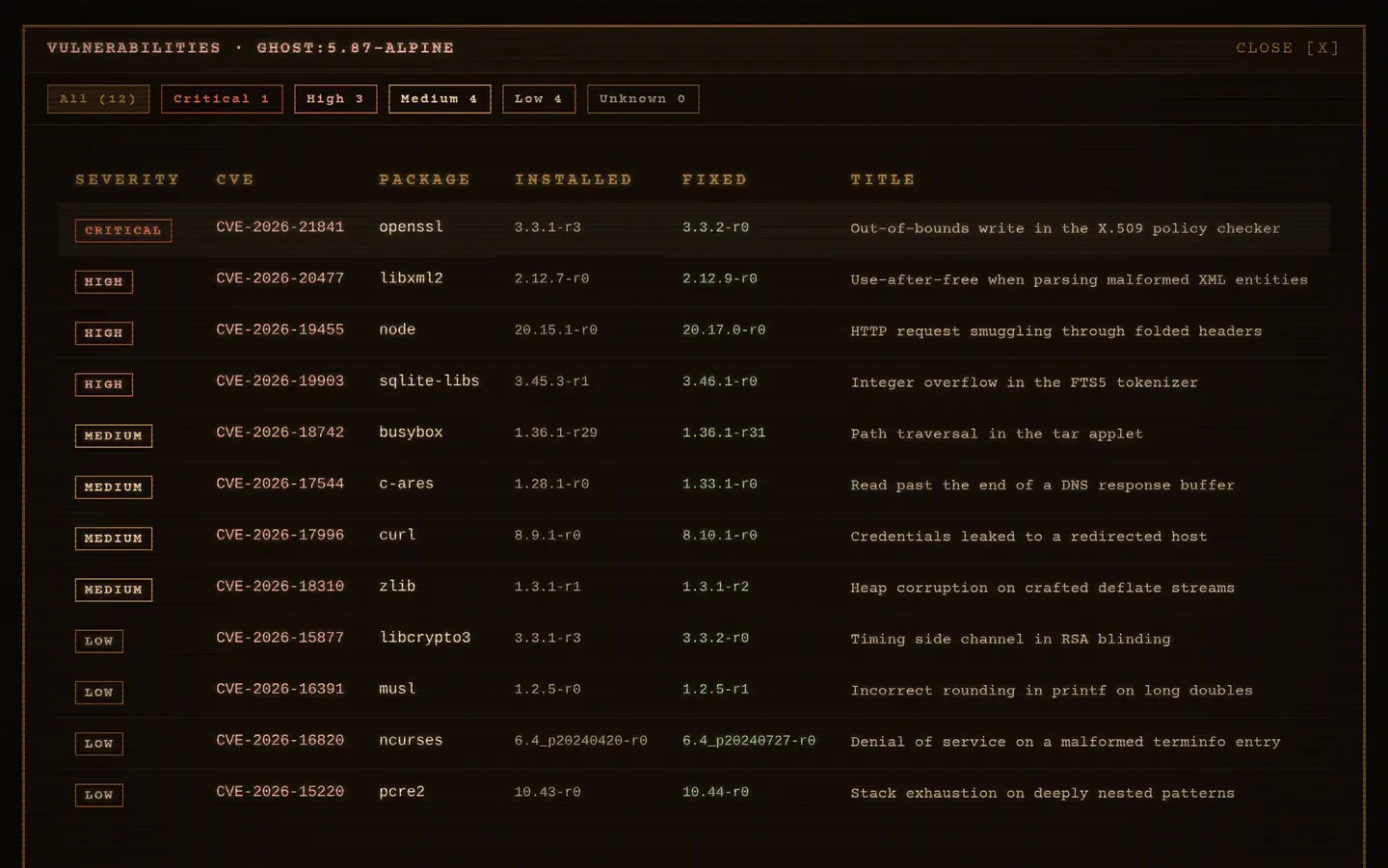
All aggregation lives in the shared core crate, so the web UI, TUI and CLI
report the same numbers.
Scheduled rescans
Section titled “Scheduled rescans”In-use images are rescanned automatically every
KAIO_TRIVY_SCAN_INTERVAL_HOURS hours (default 24), so
freshly-disclosed CVEs surface even on images that never changed.
The check runs at startup and at each interval, but only (re)scans images whose last scan is older than the interval, or that were never scanned. That makes it restart-resilient: bouncing the server does not storm the registry or the CPU.
Set the variable to 0 to disable scheduled rescans entirely.
The Trivy database cache
Section titled “The Trivy database cache”Trivy’s vulnerability database is cached in a dedicated Docker volume, so only the first scan pays the download cost. That first scan runs alone to warm the cache before later scans start running concurrently.
Configuration
Section titled “Configuration”| Variable | Default | Effect |
|---|---|---|
KAIO_TRIVY_IMAGE |
aquasec/trivy:latest |
Scanner image: pin it, or point it at a mirror |
KAIO_TRIVY_CONCURRENCY |
2 |
Max concurrent scans |
KAIO_TRIVY_SCAN_INTERVAL_HOURS |
24 |
Rescan interval; 0 disables |
Where it is stored
Section titled “Where it is stored”The image_scans table keeps the latest scan per image: severity counts and the
full CVE list as JSON. It is indexed on image_name, which backs the join
against containers.image hit on every dashboard poll.
Related
Section titled “Related”Kaio, built by Régis Gaidot