
Multiple servers
Kaio manages the Docker daemon of the host it runs on. To operate several hosts, run Kaio on each of them and have them join the instance you use as your entry point, which keeps the registry.
Nothing distinguishes a node from an ordinary Kaio: the API it already serves is the protocol. The instance you type commands at simply keeps a list of the others, knows whether they answer, and drives them from its own interfaces.
A server joins by presenting a join token, and the registry fills itself.
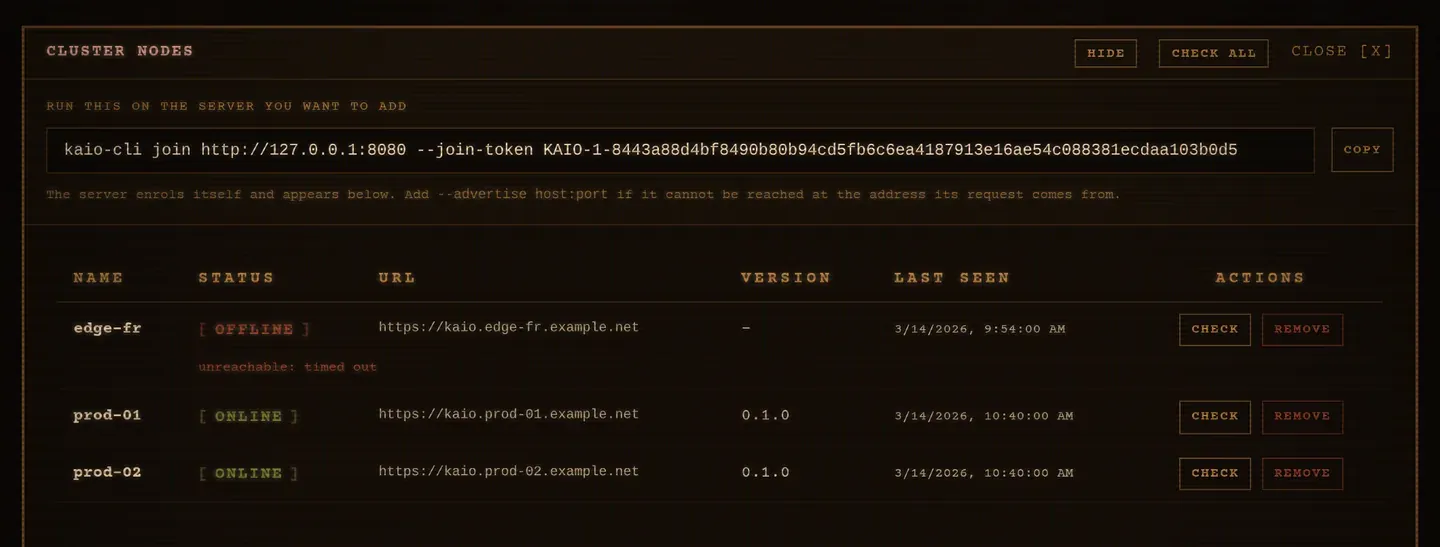
All three interfaces then read it: the web UI under Manage → Nodes, the
TUI’s Nodes tab, and kaio-cli node on the command line.
Join a server to the cluster
Section titled “Join a server to the cluster”On the server you use as your entry point, take the join token. The first call mints it, and the same one comes back afterwards:
kaio-cli cluster tokenTo add a server to this cluster, run the following on it:
kaio-cli join <this server's address> --join-token KAIO-1-8443a88d…Run that on the new server. It enrols itself:
kaio-cli join 10.0.0.1:8080 --join-token KAIO-1-8443a88d… --name web-01Joined the cluster at http://10.0.0.1:8080 as web-01.Nothing was typed on the control plane, and its registry now holds web-01. The
web UI shows it arrive without a reload: joining records an event, and the Nodes
panel follows the same stream the dashboard does.
kaio-cli cluster info, on either server, says which role it plays: a server can
keep a registry, belong to a cluster, both, or neither.
A joining server keeps that token, so the control plane can recognise itself on the few routes that ask for a credential: the ones that hand out a stack’s secrets or its volume data, used by Copying a stack. Nothing else asks for it again.
Rotating it (kaio-cli cluster token --rotate) stops new servers using the old
string. Servers already enrolled keep running and keep being probed, but they
still hold the retired token: on those few routes they answer 401 until they
join again.
The name and the address
Section titled “The name and the address”--name defaults to the host’s own name; the control plane lowercases it into
the node-name charset and suffixes it if it is taken, so two hosts called web
both get in, as web and web-2. Joining twice from the same address keeps the
entry already there rather than piling up duplicates.
Identity
Section titled “Identity”Every Kaio mints an identity for itself the first time it needs one, and keeps
it for the life of its data/. It is what a joining server presents, and it
becomes the id of its row in the registry.
That is what lets a node move. A server whose address changes (a DHCP lease, a container on a new bridge) simply joins again: it is recognised, its address is corrected, and it keeps its name. No second entry, no stale row left answering nothing.
A server that was reinstalled arrives with a new identity, so it cannot be recognised. It is enrolled alongside the row it replaces, and that old row is dropped only once the newcomer has actually answered at that address. Naming someone else’s address is therefore not enough to evict them.
It is also how a server knows not to enrol itself:
The control plane refused the join: This server is the control plane;it cannot join itselfAnd how a probe tells a node apart from a stranger that took its address:
/api/health carries the identity, so a reply from the wrong machine is
reported as unreachable rather than vouched for.
--advertise host:port says how the control plane should reach the new server,
and you rarely need it: the joining server reports its own KAIO_ADDR, and the
control plane fills in the address the request arrived from when that address is
a wildcard. A server listening on 0.0.0.0:9000 is therefore enrolled at the
right port without being told.
Give it when the address the server knows about is not the one others reach it at. Three cases, and the middle one is easy to miss:
- behind NAT, or a reverse proxy on another host and port;
- a published port that differs from the internal one. With
ports: "9000:8080"andKAIO_ADDR=0.0.0.0:8080, the server reports port 8080, which is the one inside the container. The control plane pairs it with the host’s address and enrols an unreachable:8080. Pass--advertise <host>:9000; - the two servers on the same machine, where the request appears to come from the control plane itself.
When nothing usable can be worked out, Kaio says so rather than guessing:
The control plane refused the join: Could not work out how to reach this node:pass --advertise <host:port>There is no other way in
Section titled “There is no other way in”A server enters the registry by joining, and by nothing else: there is no command and no form that declares one from the control plane. That keeps one fact in one place: the node itself says where it is, rather than someone retyping an address that may already be wrong.
Leaving
Section titled “Leaving”A server leaves on its own, with one command, from the machine that is leaving:
kaio-cli cluster leaveLeft the cluster at http://10.0.0.1:8080. It no longer lists prod-01.It tells its control plane to drop the registry entry, then forgets it locally. Both sides agree afterwards, and the route through the control plane closes with the entry.
A node does not depend on its control plane being up to go: if it cannot be reached, the node forgets the cluster anyway and says what is left to do.
Left the cluster at http://10.0.0.1:8080 locally.Warning: it was not told (could not reach it: …), so it still lists prod-01.Remove it there with `kaio-cli node rm prod-01`.The control plane can also evict: kaio-cli node rm prod-01, Remove in the
web UI, or d in the TUI. That drops the entry without telling the node, which
keeps thinking it is a member until someone runs cluster leave on it. Either
side can end it; only the node’s own command leaves both in agreement.
Reachability
Section titled “Reachability”Each node carries the result of its last probe, which is a call to the node’s
/api/health:
| Status | Meaning |
|---|---|
online |
The node answered and identified itself as a Kaio |
offline |
Unreachable, or it answered something else |
unauthorized |
Something in front of the node asked for a credential |
unknown |
Joined, never probed |
VERSION is what the node reports, which is how you spot a host left behind by
an upgrade. SHA is the git commit that binary was built from, which separates
two hosts that claim the same version because one of them runs a build from
before a fix. LAST SEEN is the last successful contact and survives a node
going down, so you can tell a host that just died from one that never answered.
Probe on demand, one node or all of them:
kaio-cli node check prodkaio-cli node checkThe web UI does the same with the per-row Check button and Check All;
the TUI with c and C.
The server also probes every node by itself, every
KAIO_NODE_HEALTH_INTERVAL_SECONDS (default 60, 0 disables it). Probes run
concurrently and a status change records an event, so a node flapping shows up
in the event log while a node quietly staying online does not fill it.
Inspect
Section titled “Inspect”kaio-cli node ls # every node, with its last probekaio-cli node show prodkaio-cli --json node show prodThe web UI lists the same rows with a Check and a Remove button each, and
the TUI’s Nodes tab does it with c (probe the selected node), C (probe
them all) and d (remove it).
Act on a node
Section titled “Act on a node”There are two ways, and they differ in what happens when the node leaves the registry.
Through the control plane
Section titled “Through the control plane”Pick a node from the @ this server ▼ selector in the header and the whole
dashboard switches to it: stacks, containers, metrics, events, logs, CVE scans
and the container terminal all report that node. The page moves to
/node/<name>, so that view is a link you can share. Deploying a stack there is
the ordinary + STACK button.
On the command line, name the node and what to run on it:
kaio-cli node prod-01 run statuskaio-cli node prod-01 run stack deploy web compose.ymlkaio-cli node prod-01 run tuiAnything after run is an ordinary Kaio command, forwarded by the control plane
to that node.
Removing a node ends this. The route is the registry entry, so
kaio-cli node rm prod-01 makes every one of the commands above answer:
Node 'prod-01' has not joined this clusterStraight at it
Section titled “Straight at it”Aiming at the address always works, cluster or no cluster:
KAIO_ADDR=10.0.0.2:8080 kaio-cli statusOr open the node’s own address in a browser: every Kaio serves the full web UI.
- Every node needs its own
data/. Nodes share nothing: each keeps its own database, its own stack files and its own history. - The join token is a credential. It lives in the control plane’s database
in clear text, and anyone who reaches that server can read it and enrol
against it. Rotate it with
kaio-cli cluster token --rotateif it leaks.
Kaio, built by Régis Gaidot