
Copying a stack
A stack is a directory on one host: its compose.yml, its .env, its history
in SQLite, and the named volumes holding its data. Copying it somewhere else
means carrying all four, and the control plane does it in one call.
The source is never stopped, written to or removed. A copy that fails part way undoes itself on the destination. So a copy costs time when it goes wrong, never data.
What it is for
Section titled “What it is for”- Clone production into staging, with real data, to rehearse a change.
- Seed a new server before pointing anything at it.
- Fan the same stack out to several edge hosts.
- Stand up a twin to test a version bump without touching the original.
Moving a stack for good, stopping the source and removing it afterwards, is a separate operation and is not covered here.
From the terminal
Section titled “From the terminal”kaio-cli stack copy blog --to prod-02 # definition only, not startedkaio-cli stack copy blog --to prod-02 --with-volumes # carry the data acrosskaio-cli stack copy blog --as blog-staging # clone it here under another namekaio-cli stack copy blog --to prod-02 --dry-run # show the plan, change nothing--to and --from name servers as kaio-cli node ls does. Leaving one out
means the server you are talking to, so a copy that stays put needs a different
name with --as.
Start with --dry-run. It answers the plan it would follow and changes nothing
on either end.
Would copy blog from this server to prod-02 as blog-staging╭───────────┬───────────────────┬────────┬────────╮│ VOLUME ┆ BECOMES ┆ SIZE ┆ COPIED │╞═══════════╪═══════════════════╪════════╪════════╡│ blog_data ┆ blog-staging_data ┆ 1.3 MB ┆ yes │╰───────────┴───────────────────┴────────┴────────╯Nothing was changed. Drop --dry-run to carry it out.From the browser
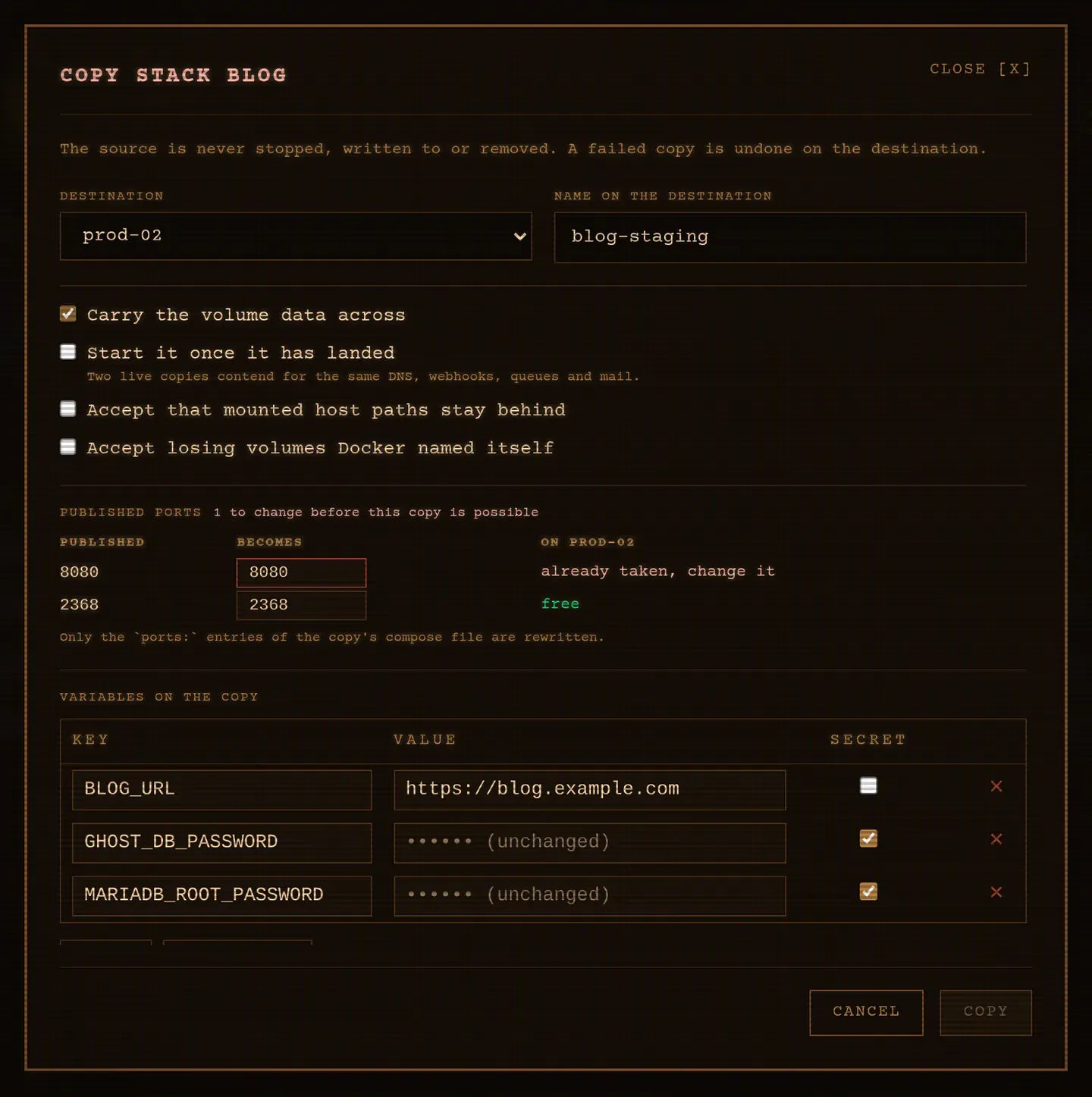
Section titled “From the browser”ACTIONS → ⧉ Copy to… on any stack. The plan works itself out as you type: pick the destination and the name it takes there, and the dialog fills in the published ports and the variables the copy will have, both editable in place. A port already taken on the destination is marked, counted at the top of the table, and Copy stays out of reach until you have moved it.
From the TUI
Section titled “From the TUI”C on the Stacks tab. ↑ ↓ walk the rows: the destinations, the name, then
every published port. i edits the row you are on, e opens the variables, and
v s b a toggle the four options. A port already taken is shown in red,
and Enter refuses to copy until it has moved. Esc cancels.
A clone on the same server needs new ports
Section titled “A clone on the same server needs new ports”A copy carries the compose file as it was written, so on the same host it claims the ports the source already holds. Left alone, the clone is created and can never start.
So the copy is refused, started or not, and the refusal names a free port:
port(s) 8091 (try 8092) are already published on this server, so the copy couldbe written but never started. Move them with `publish` or `port_offset`, or passallow_port_clash to write it anywayA copy that could never start is not a copy worth writing: it would sit there
looking healthy and be unusable. Move the ports instead, and only the ports:
entries of the copy’s compose file are rewritten. Comments, ordering and
everything else stay as they were.
kaio-cli stack copy web --as web-02 --publish 8091:9091 --startkaio-cli stack copy web --as web-03 --port-offset 2000 --start--publish is repeatable and wins over --port-offset, which moves every
published port by the same amount. In the browser, the dialog shows a table of
8091 → [9091] rows and marks the ones already taken, so Copy stays out of
reach until every clash is settled. In the TUI, ↑ ↓ walk the same rows and
i edits the one you are on.
A port written as ${HTTP_PORT}:80 is left alone: that one belongs to the
variables below.
The variables travel, and can be changed on the way
Section titled “The variables travel, and can be changed on the way”A stack often carries its identity in its environment: a URL, a virtual host, a database name. Those are exactly what you want different on a clone.
kaio-cli stack copy web --as web-02 --env SITE_URL=https://staging.example.netkaio-cli stack copy web --as web-02 --env-file staging.envIn the browser, Variables on the copy is the same editor the deploy dialog uses, filled with the stack’s own variables and open from the start. A secret left untouched keeps its stored value; typing over it replaces it on the copy only. The source is not changed either way.
It does not start on its own
Section titled “It does not start on its own”Without asking for it, the copy is written and left stopped. Two live copies of
the same stack contend for the same DNS records, webhooks, queues and mail, and
whichever wins is not up to Kaio. Start it once you have looked at it:
--start on the command line, the checkbox in the browser, s in the TUI.
What crosses, and what does not
Section titled “What crosses, and what does not”| Carried | |
|---|---|
compose.yml |
Yes, verbatim |
| Variables, secrets included | Yes |
| Version history, each with its own variables | Yes, version numbers preserved |
| Named volumes | Only with --with-volumes |
| Mounted host paths (bind mounts) | No |
external volumes |
No, they belong to something else |
| Volumes Docker named itself | No, they have no name to recreate |
| Images | No, the destination pulls them |
Named volumes follow the destination project: copying blog as blog-staging
moves blog_data into blog-staging_data. A volume given an explicit name:
keeps it, which is what you want on another server.
What stops a copy before it starts
Section titled “What stops a copy before it starts”A copy is refused, with the reason, when:
- the destination already runs a stack by that name;
- the stack mounts host paths. A path that exists on one server has no reason
to exist on the next, and copying it blindly lands the wrong ownership on the
wrong files. Pass
--allow-bindsto accept that they stay behind; - a volume is anonymous and the data was asked for. Its contents are real but
its name is not, so it cannot be recreated on another host. Declare it under
volumes:in the compose file and redeploy, which is the better answer, or pass--allow-anonymous-volumesto copy the stack without it; - a port the stack publishes is already published on the destination and the copy was asked to start. A copy that is only written cannot clash;
- a volume keeps its own name and both ends are the same server, because the copy would then mount the volume the source is running on. Two stacks on one data directory is not something to discover later.
Every one of those is a refusal rather than a warning for the same reason: each would otherwise produce a copy that looks healthy and is quietly missing its data.
Under the hood
Section titled “Under the hood”sequenceDiagram
autonumber
participant S as Source
participant C as Control plane
participant D as Destination
C->>S: Export the stack
S-->>C: compose, variables, versions, mounts
C->>D: What runs here, on which ports?
D-->>C: stacks and published ports
Note over C: The plan: new volume names,<br/>ports to move, what blocks it
alt A blocker stands
C-->>C: Refused. Nothing written anywhere.
else The plan is clear
C->>D: Write the stack, stopped
loop Each named volume
S-->>C: tar stream
C-->>D: tar stream
end
opt A start was asked for
C->>D: Bring it up
end
opt Anything failed on the way
C->>D: Remove the stack, and the volumes it created
end
end
Note over S: Never stopped, written to or removedThe control plane reads from the source and writes to the destination, so the two servers never need to reach each other: only the control plane needs to reach both. Volume data is streamed, one volume at a time, and never buffered, so the size of a volume costs time and bandwidth rather than memory.
Reading a volume and writing one are done by a throwaway container running
tar, with no network and nothing mounted but the volume itself. It is the same
pattern the CVE scanner uses, so there is nothing to install on either host.
Because the routes underneath hand out secrets and data in the clear, they ask for the cluster join token, which the control plane already holds. Over plain HTTP they still cross the wire readable by anything on the path: put the cluster behind TLS or on a network you trust before copying a stack across it. See Security and the API reference.
Kaio, built by Régis Gaidot